

资源介绍
Create figures with spherical symmetry with ease
Compatibility: Blender 4.2.0+
官方介绍(中文整理)
创建具有球体对称性的数字。
Symple(对称组)
添加具有离散球对称(二面体、圆形体、四面体、八面体、立面体)的物体。
使用方法
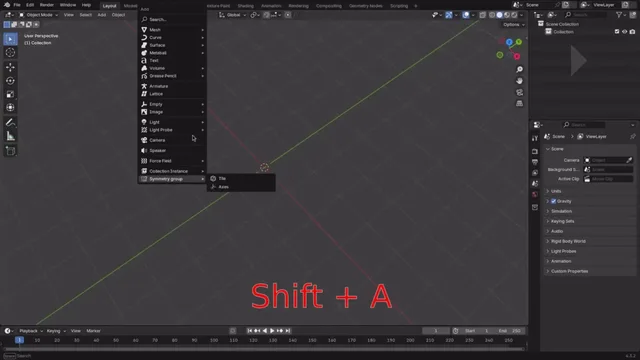
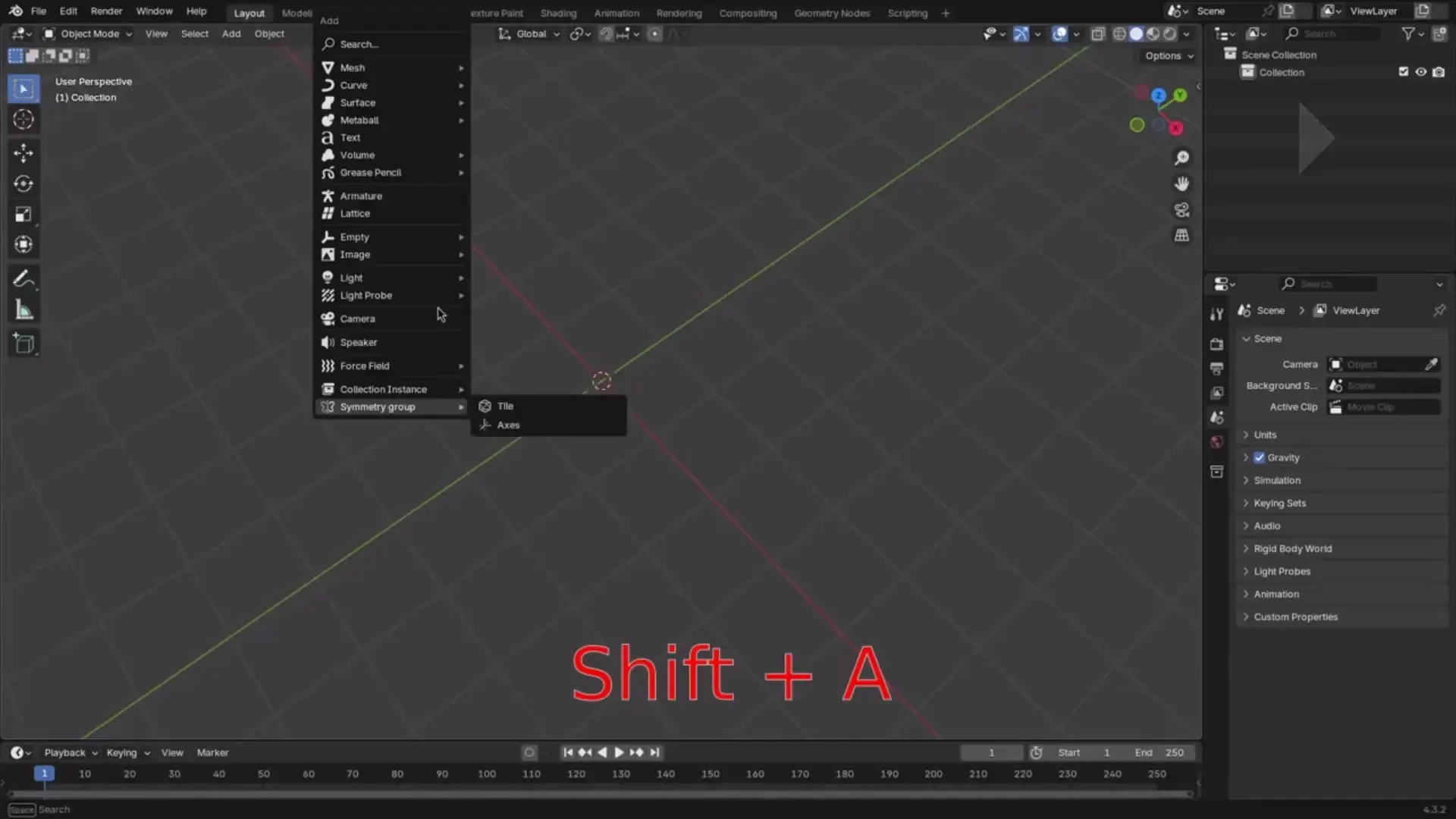
在对象模式中,按 Shift+A (添加对象) 键。然后查找对称组。您可以选择是添加网格(基本瓷砖)还是一组轴。指定类型的一组对象将显示在与组符号相同名称的空对象上。所有对象都共享相同的数据,但只在位置、旋转和比例上有所不同。
选项锁定变换会固定对象的位置、旋转和大小。这是为了避免打破对称。您仍然可以将对象的母体移动为空,从而移动对象。
选项签名指对应于球形对称组的 Orbbide 签名。 如果您不知道, 您可以从预设中选择一个选项。 (注意: 签名中数字的不同排列将产生略微不同的基本域, 即使组合相同 )。
另一种使用它的方法是:右键单击对象,然后从对象进行对称组。在此情况下,使用对象的数据而不是瓷砖。这样您就可以用曲线、骨头等等来使用它。
提示和缺点
使用它与额外网状对象扩展号一起使用是件好事, 包括普通固体。 然后可以清除、 分解和捏紧不需要的面孔。
如果您不小心, 网格会断开。 如果您将光标留在组合的中心, 使用选项 Pivot 点 > 3D 光标帮助。 一般来说, 尝试不同的点。 或者, 搜索如何用密钥形状解决这个问题。 如果您想要雕刻, 您也可以在网格边框中添加遮罩。
如果这是一个修饰符, 这将是一件好事, 但不幸的是, 这不可能使用 python 脚本。 一种变通办法是在对象上添加多个镜像/ 矩阵修饰符 , 并选择对称组的一些轴作为对称对象。 这样可以更容易不折断网格, 并与其他修饰符更好地合作。
在对象模式上的 Ctrl-L 允许您链接数据/ 复制修改器。
右键单击组空的父版,可以选择/ 删除整个等级,而不仅仅是父版。同样, Shift+Click on the eyes 也可以隐藏整个等级。
选择等级体系中的所有 meshes, 并按 Ctrl- J 键加入 meshes , 如果您想要有一个统一的网格。 请注意, 进一步的编辑会打破对称。 您可以将相对邻近的顶点合并 : 按距离编辑模式 > M >。
查看官方原文摘要(English)
Symple (symmetry groups)
Adds objects with discrete spherical symmetry (dihedral, cyclic, tetrahedral, octahedral, icosahedral).
Usage
In object mode, press Shift+A (add object). Then look for Symmetry group. You can choose whether to add a mesh (fundamental tile) or a group of axes. A group of objects of the specified type will appear parented to an empty object with the same name as the group signature. All objects share the same data, only differing in location, rotation and scale.
Option lock transforms fixes the location, rotation and scale of the objects. This is to avoid breaking the symmetry. You can still move the objects by moving the parent empty.
Option signature refers to an Orbifold signature that corresponds to a spherical group of symmetries. If you do not know about it, you can choose an option from the presets. (Note: different permutations of the numbers in the signature will produce slightly different fundamental domains, even if the group is the same).
An alternative way to use it is: right-click on an object, and then Symmetry group from object. In this case, the object's data is used instead of a tile. This way you can use it with curves, bones, and so on.
Tips and shortcomings
It's nice to use it together with the Extra mesh objects extension, which includes regular solids. You can then remove, subdivide and pinch unneeded faces.
The mesh will break if you are not careful. If you leave the cursor at the center of the group, using the option Pivot point > 3D cursor helps. In general, try with different pivot points. Alternatively, search how this problem can be solved using key shapes. You can also add a mask to the mesh border if you want to do sculpting.
It would be nice if this was a modifier, but unfortunately this is not possible using python scripts. A workaround is to add multiple Mirror / Array modifiers on an object and select some of the axes of a symmetry group as objects of symmetry. This makes it easier not to break the mesh, and to work better with other modifiers.
Ctrl-L on object mode lets you link data / copy modifiers.
Right click on the group empty parent lets you select / delete the full hierarchy, and not only the parent. Similarly, Shift+Click on the eye lets you hide the whole hierarchy.
Select all the meshes in the hierarchy and press Ctrl-J to join the meshes, if you want to have a unified mesh. Note that further edits will break the symmetry. You can merge relatively nearby vertices like this: Edit mode > M > by distance.
安装方法
- 打开 Blender「编辑 → 偏好设置 → 获取扩展(Get Extensions)」,搜索 Symple (symmetry groups),可直接从官方库安装。
- 手动安装时,选择适合当前 Blender 版本与系统的 ZIP 包,在「获取扩展」右上角菜单选择「从磁盘安装(Install from Disk)」,选中 ZIP 文件,无需解压。
- 安装后,在偏好设置的「插件(Add-ons)」中确认已启用,并按作者说明使用。
下载安装包
请选择与你的 Blender 版本和操作系统相符的文件,下载由 Blender 官方扩展库提供。
正在加载安装包…
来源与许可
- 作者 / 维护者:Martín-Torres-Valverde
- 许可:SPDX:GPL-3.0-or-later
- 来源:Blender 官方扩展库


暂无评论内容