

资源介绍
Import data to spreadsheet for use with geometry nodes
Compatibility: Blender 4.2.0+
官方介绍(中文整理)
将数据导入电子表格,用于几何节点。
由 Jan-Hendrik Müller 编辑的新 CSV 导入器
有一个新的改进的 CSV 导入器: https://extensions.blender.org/add-ons/csv-importer/
Blender 电子表格导入
将 CSV 或 JSON 数据导入Blender电子表格。 然后这些数据可以用可视化的几何节点处理。
使用方法
- 通过文件 / 导入/ 电子表格导入器打开 Blender 中的导入器
- 使用文件浏览器选择 .csv 或.json 文件
- 单击 + 图标在列表右侧添加要导入的字段名称
- 导入 CSV 时, 字段名称必须显示在 csv 的页眉行中。 页眉行是命名列的行
- 导入 JSON 时, 字段名称必须出现在数据阵列中的对象中。
- 当导入 JSON 时, 请指定您 JSON 文件内的数据所在的数组名称。 它必须位于 root JSon 对象中, 并且必须包含一个数组。
- 导入 CSV 时, 请检查分隔符是否正确
- 在信头行前面行前行导入 CSV 时,通过设置丢弃导行值丢弃这些
- 按下右下角的导入电子表格按钮。 导入器将创建一个以导入文件命名的新对象。 对象 wil 将它附加名为 csv_ data 或json_ data, 取决于导入的文件类型。
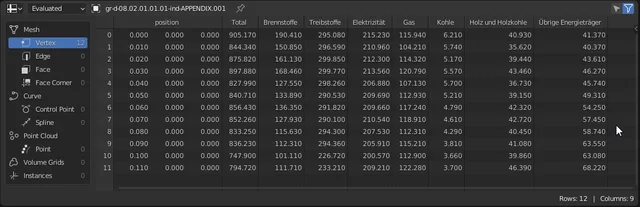
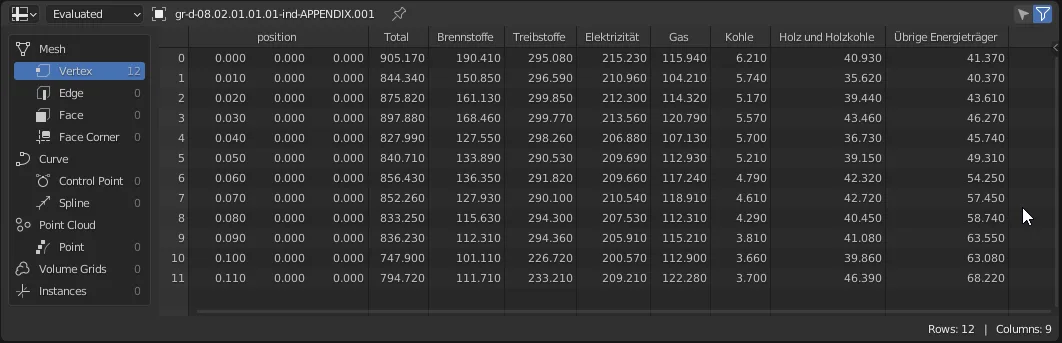
- 检查 Blender 中的电子表格查看器, 看看是否正确导入了数据。
示例节点设置
要在任何几何节点树中使用导入的数据,请添加一个对象信息节点,并选择对象字段中含有导入数据的对象。
如果您以后想要替换数据, 您可以在选定对象的对象数据属性中这样做 : 将另一个网格数据块链接到对象上, 值将会更新。 如果在新链接的数据块中仍然存在使用过的列名, 则所有内容都应该按预期更新。
查看官方原文摘要(English)
New CSV Importer by Jan-Hendrik Müller
There's a new and improved CSV Importer: https://extensions.blender.org/add-ons/csv-importer/
Blender Spreadsheet Import
Import CSV or JSON data into blender spreadsheet. The data can then be processed with geometry nodes to be visualized.
Usage
- Open the importer in Blender via File / Import / Spreadsheet Importer
- Use the filebrowser to choose a .csv or .json file
- Add the field names to be imported by clicking the + icon to the right of the list
- When importing CSV, the field names must be present in the header row of the csv. The header row is a line that names the columns
- When importing JSON, the field names must be present in the objects within the data array.
- When importing JSON, specify the array name where the data is in your JSON File. It must be in the root JSON object, and it must contain an array.
- When importing CSV, check if the delimiter is correct
- When importing CSV with lines before the header row, discard these by setting the Discard leading lines value
- Press the Import Spreadsheet button in the bottom right. The Importer will create a new Object named after the imported file. The Object wil have Mesh Data attached to it called csv_data or json_data depending on the imported file type.
- Check the Spreadsheet viewer in Blender to see if the data has been imported correctly.
Example Node Setup
To use the imported data in any geometry nodes tree, add an Object Info node and select the object containing the imported data in the object field.
If later you want to replace the data, you can do this in the object data properties of the selected object: Link another mesh data block to the object, and the values will update. If used column names still exist in the newly linked data block, everything should update as expected.
安装方法
- 打开 Blender「编辑 → 偏好设置 → 获取扩展(Get Extensions)」,搜索 Spreadsheet Import,可直接从官方库安装。
- 手动安装时,选择适合当前 Blender 版本与系统的 ZIP 包,在「获取扩展」右上角菜单选择「从磁盘安装(Install from Disk)」,选中 ZIP 文件,无需解压。
- 安装后,在偏好设置的「插件(Add-ons)」中确认已启用,并按作者说明使用。
下载安装包
请选择与你的 Blender 版本和操作系统相符的文件,下载由 Blender 官方扩展库提供。
正在加载安装包…
来源与许可
- 作者 / 维护者:smonbrogg
- 许可:SPDX:GPL-3.0-or-later
- 来源:Blender 官方扩展库


暂无评论内容