

资源介绍
Extra tools for Grease Pencil
Compatibility: Blender 4.3.0+
官方介绍(中文整理)
Grease Pencil 的额外工具。
Grease Pencil 的额外工具。 此扩展名为 Blender 4. 1 捆绑的附加件的一部分。
- “Grease Pencil Tools”是 Blender 官方扩展库中的插件,本段具体功能请展开查看下方官方原文。
- 文件文件文件文件文件文档文件文件文件会议文件文件文件文件的文件文件文件文件文献文件文件文件资料文件文件文件,文件文件文件文文件文件文件记录文件文件文件归档文件文件文件(文件文件文件 文件文件文件的文件的文件文件文件的文件文献文件文件的文件文档文件文件文档,文件文件文档的文件文件文件文献文献文件文件文档文档文件文件文献的文件文件文件文档文献文件文件文献文档文件文件的文件文文件文件的文件会议文件文件文件的文件资料文件文件文档文文件文件文献会议文件文件文件文档会议文件文件文件文献文文件文件文档资料文件文件的文件提供文件文件文件 Do文件文件文件存档文件文件文件文件中文件文件文件存储文件文件文件保存文件文件文件Do文件文件文件 do文件文件文件
- Daniel Martinez Lara拍摄的影片
- 作者:Samuel Bernou, 与油笔团队成员Antonio Vazquez、Daniel Martinez Lara和Matias Mendiola提出的许多建议及反馈。
在 Tab Grease Pencil 中添加选项
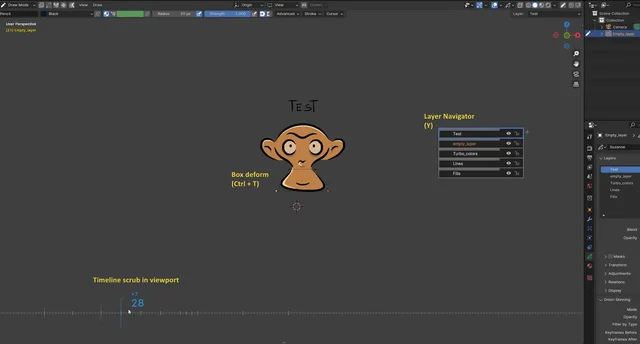
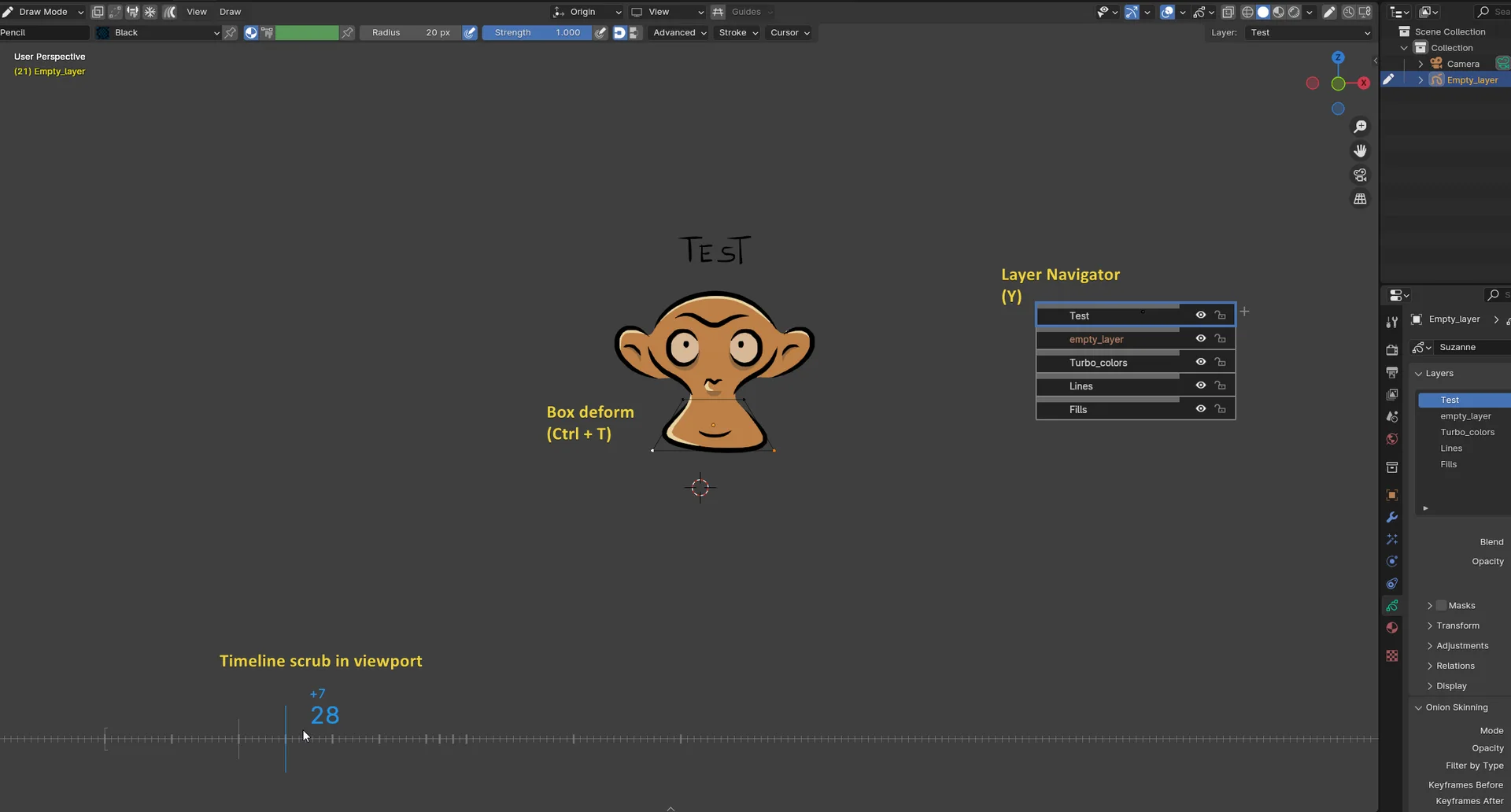
Ctrl + T 上的方框变形
以 lattice subdiv 和 spline 变形为例。
详情, 请检查此方框 变形 YouTube 演示
如何使用 : (在 adton 首选项中相同教义 ) 使用快捷键 Ctrl + T 在可用模式中使用 Ctrli + T
模式和变形目标:
- 对象模式 : 整个 GP 对象已变形
- GPencil 编辑模式 : 变形选中点
- Gpencil 油漆 : 变形上一个阵列
快捷键( 也显示在顶部栏中) :
- 空栏/ Enter : 确认( 与 Shift 连接, 以让 lattace 到位 )
- 删除 / 后空 / ctrl+T / Tab (两次) : 取消
- M: 随时切换线性模式和 Spline 模式
查看官方原文摘要(English)
Extra tools for Grease Pencil. This extension was part of Blender 4.1 bundled add-ons.
- Location: Sidebar → Grease Pencil → Grease Pencil Tools
- Documentation
- Demo video by Daniel Martinez Lara
- Author : Samuel Bernou with a lot of suggestions and feedback from grease pencil team members, Antonio Vazquez, Daniel Martinez Lara and Matias Mendiola.
Add option in Tab Grease Pencil
Box deform on Ctrl + T
Example with lattice subdiv and spline deformations.
For details, check this Box deform YouTube demo
How to use: (same tutorial in addon preferences) Use the shortcut Ctrl + T in available modes The lattice box is generated facing your view, so be sure to face canvas to avoid unintentional anamorphic offset Then use the following shortcuts (also displayed in top bar):
Modes and deformation target:
- Object mode : The whole GP object is deformed
- GPencil Edit mode : Deform Selected points
- Gpencil Paint : Deform last Strokes
Shortcuts (also displayed in top bar):
- Spacebar / Enter : Confirm (Combine with Shift to let the lattice in place)
- Delete / Backspace / ctrl+T / Tab(twice) : Cancel
- M : Toggle Linear and Spline mode at any moment
安装方法
- 打开 Blender「编辑 → 偏好设置 → 获取扩展(Get Extensions)」,搜索 Grease Pencil Tools,可直接从官方库安装。
- 手动安装时,选择适合当前 Blender 版本与系统的 ZIP 包,在「获取扩展」右上角菜单选择「从磁盘安装(Install from Disk)」,选中 ZIP 文件,无需解压。
- 安装后,在偏好设置的「插件(Add-ons)」中确认已启用,并按作者说明使用。
下载安装包
请选择与你的 Blender 版本和操作系统相符的文件,下载由 Blender 官方扩展库提供。
正在加载安装包…
来源与许可
- 作者 / 维护者:SamuelBernou
- 许可:SPDX:GPL-3.0-or-later
- 来源:Blender 官方扩展库


暂无评论内容