


资源介绍
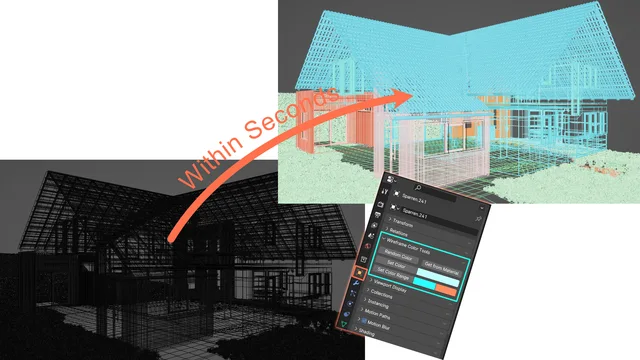
Change Object Colors based on different kinds of methods
Compatibility: Blender 4.2.0+
官方介绍(中文整理)
基于不同类型方法改变对象颜色。
这个加子可以很容易地 将重叠的线框 造成的混乱的景台 变成清晰可读的
这组工具使用对象颜色。 请务必设置您的视图端阴影以显示对象颜色。 否则您将会看到 adon 效果。 有两张图像附着, 显示如何在线框和固态模式下做到这一点。
特性: 设置颜色: 立即设置多个对象的对象颜色
设定颜色范围 : 将对象设定为您选择的颜色范围
随机颜色 : 将选定对象设置为随机对象颜色
从材料获取信息: 将您选中的对象设置为对象材料视图颜色的颜色
查看官方原文摘要(English)
This addon makes it really easy to turn messy viewports caused by overlapping wire frames into clearly readable ones.
This set of tools makes use of object colors. Be sure to set your viewport shading up to display object colors. Otherwise you will to see the addons effect. There are two images attached demonstrating how to do this in wireframe and solid mode.
Features: Set Color: Set the object color of multiple objects at once
Set Color Range: Set your objects to a range of colors of your choice
Random Color: Sets your selected objects to a random object color
Get from Material: Sets your selected objects to the color of the objects materials viewport color
安装方法
- 打开 Blender「编辑 → 偏好设置 → 获取扩展(Get Extensions)」,搜索 Wireframe Color Tools,可直接从官方库安装。
- 手动安装时,选择适合当前 Blender 版本与系统的 ZIP 包,在「获取扩展」右上角菜单选择「从磁盘安装(Install from Disk)」,选中 ZIP 文件,无需解压。
- 安装后,在偏好设置的「插件(Add-ons)」中确认已启用,并按作者说明使用。
下载安装包
请选择与你的 Blender 版本和操作系统相符的文件,下载由 Blender 官方扩展库提供。
正在加载安装包…
来源与许可
- 作者 / 维护者:Lumpengnom
- 许可:SPDX:GPL-2.0-or-later
- 来源:Blender 官方扩展库


![[搬运]超级粘液资产合集-魔酷网](https://i.blender.kim/wp-content/uploads/2026/01/20260131142748712.png)


暂无评论内容