

Blender 官方扩展库收录Blender 插件
资源介绍
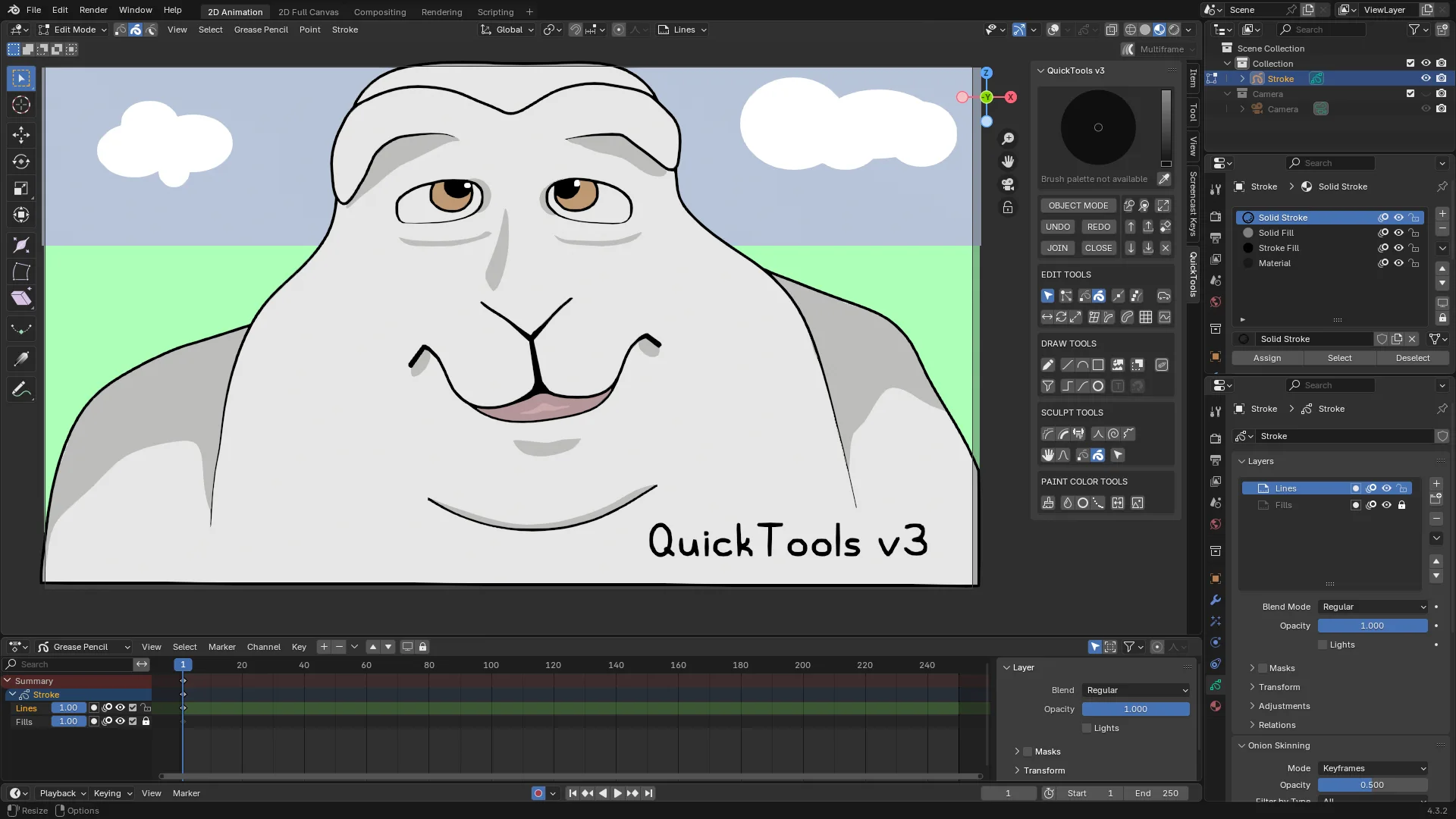
Grease Pencil Toobar in N sidebar with auto mode switch
Compatibility: Blender 4.3.0+
官方介绍(中文整理)
带有自动模式开关的N边栏中的Grease Pencil Toobar。
Grease Pencils 的快速工具箱
Grease Pencil QuickTools 是一个Blenderaddon, 将N边栏中最常用的 Grease pencils 工具分组。 当选择快速工具并统一刷子颜色时, 它会自动切换到正确的模式。
附加特性
快速快取快快取
- 磁带记录器和显示器在选定中点上的厚度。 只能压缩选中的点。 SHIFT 仅用于压缩, CTRL 仅用于删除。
快速对齐快速对齐
- 通过选择要对齐的选定点来水平或垂直对齐选定点。将 SHIFT 保持相对对齐点。
快速快图文字
- 在提供的各种样式中以划线方式添加文字
- 使用 gptext_ makeer.blend 链接来建立您自己的风格
内 Indigate Stroke 内插串
- 用于在键盘间插入选定中风的快速工具。 内插不仅位置, 而且还包括颜色、 不透明性和中风厚度
锥形
- 用于绘制多边形的快速Tool 快速工具,该多边形点会折叠到当前框架的其他点。保持向跟踪中风移动的移动和 CTRL 折叠水平/垂直
快速滚动设置
- 通过滚动鼠标轮来调整选定划线的硬性(软性)。
- SHIFT + 用于调整不透明度的鼠标轮
- CTRL + 用于调整半径的滑鼠轮
查看官方原文摘要(English)
QuickTools for Grease Pencil
Grease Pencil QuickTools is a Blender addon that groups the most frequently used Grease Pencil tools in the N sidebar. It automatically switches to the correct mode when a quick tool is selected and unifies the brush colors.
Additional Features
QuickTaper
- Tapers in and out points' thickness on selected strokes. Can taper only selected points. SHIFT to taper in only and CTRL to taper out only.
QuickAlign
- Align selected points horizontally or vertically by selecting a selected point to align to. Hold SHIFT to relatively align points.
QuickText
- Add Text as strokes in various provided styles
- Make your own style with gptext_maker.blend link
Interpolate Stroke
- QuickTool for interpolating selected stroke between keyframes. Interpolates not just position but also colors, opacity, and stroke thickness
Snapigon
- QuickTool for drawing polygons that snaps points to other points on the current frame. Hold shift to trace strokes and CTRL to snap horizontal/vertical
Quick Stroke Settings
- Adjust the hardness (softness) of selected strokes by scrolling the mouse wheel.
- SHIFT + mouse wheel to adjust Opacity
- CTRL + mouse wheel to adjust Radius
安装方法
- 打开 Blender「编辑 → 偏好设置 → 获取扩展(Get Extensions)」,搜索 Grease Pencil QuickTools_v3,可直接从官方库安装。
- 手动安装时,选择适合当前 Blender 版本与系统的 ZIP 包,在「获取扩展」右上角菜单选择「从磁盘安装(Install from Disk)」,选中 ZIP 文件,无需解压。
- 安装后,在偏好设置的「插件(Add-ons)」中确认已启用,并按作者说明使用。
下载安装包
请选择与你的 Blender 版本和操作系统相符的文件,下载由 Blender 官方扩展库提供。
正在加载安装包…
来源与许可
- 作者 / 维护者:PongBuster
- 许可:SPDX:GPL-3.0-or-later
- 来源:Blender 官方扩展库
© 版权声明
本站除原创作品外的资源均收集于网络,只做学习和交流使用,版权归原作者所有,请在下载后24小时之内自觉删除。若作商业用途,请购买正版。
THE END


暂无评论内容