

资源介绍
Monitor and capture add-on profiling data
Compatibility: Blender 4.2.0+
官方介绍(中文整理)
监测并捕捉附加特征分析数据。
添加附加配置文件
该项目是重新实施由 DB3D 创建并由 Rubenmesserschmidt (Plugin-Profiler) 改进的原插件-Profileer 附加件。
原始张贴在Blender开发商论坛上。
简介
插件性能分析是Blender的 Python 公用事业插件,提供方便和软件内解决方案,以监测代码执行和在插件开发期间需要时采集特征分析数据。
使用方法
插件的两个主要特征是执行记录和性能分析。工具可在 3D 视图端栏的 Add-on 性能分析标签上找到。
日志
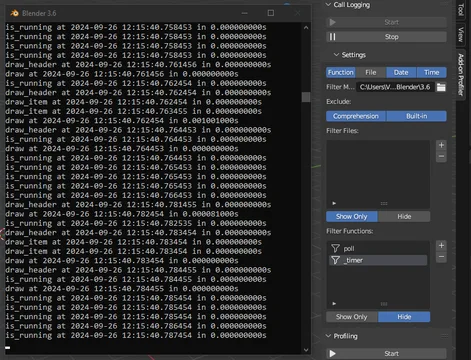
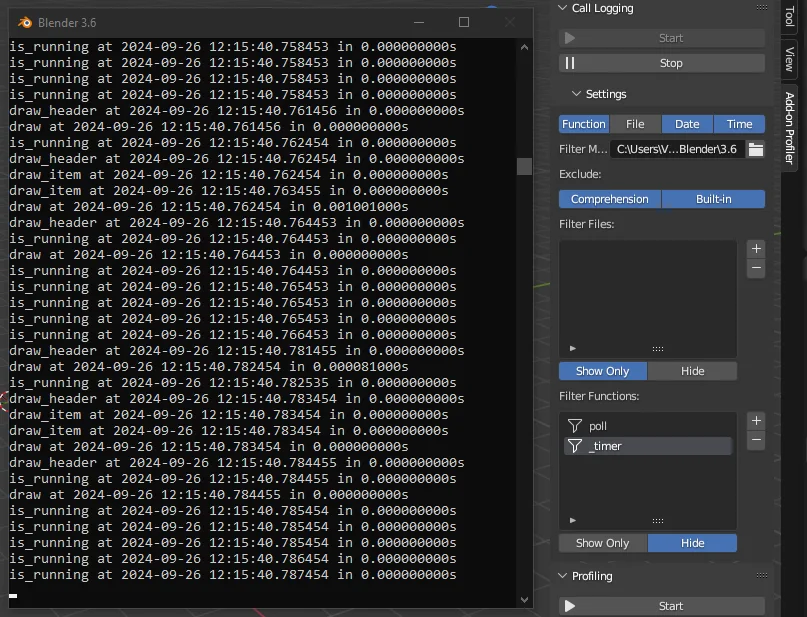
日志功能可以监测运行中的 Python 会话中的所有执行呼叫。 输出可以通过函数名称和源文件等多种选项过滤。
由于这个过程的性质,执行速度要慢得多,但通过检查活日志,可以捕捉猖獗的功能电话。
性能分析
剖析工具利用性能分析和统计模块从执行中获取性能分析数据,所采集的数据可以格式化,输出到系统控制台,或保存成性能分析数据库文件。
剖析数据(保存到文件后)可以很容易地通过Snakeviz 图书馆看到,关于图书馆使用的指示可以在Snakeviz docs中找到。
蛇蛇维兹必须作为单独的包件在本地安装。
安装说明
这种重新实施是为了与Blender4.2+释放的新扩展系统兼容。 Blender 2.900. 了解向后兼容性。
插件可以像任何其他插件一样,从包件释放中安装。关于安装插件的信息可在正式的《Blender 官方手册》中找到。
查看官方原文摘要(English)
Add-on Profiler
This project is a reimplementation of the original Plugin-Profiler add-on created by DB3D and improved by rubenmesserschmidt (Plugin-Profiler).
The original posting can be found on the Blender Developer Forums.
About
Add-on Profiler is a Python utility add-on for Blender, providing a convenient and in-software solution to monitor code execution and capture profiling data when needed during add-on development.
Usage
The two main features of the add-on are execution logging and profiling. The tools can be found on the Add-on Profiler tabs of the 3D viewport sidebar.
Logging
The logging feature makes it possible to monitor all execution calls in the running Python session. The output can be filtered by various options like function names and source files.
By the very nature of this process, the execution is considerably slower, but it makes it possible to catch rampant function calls by inspecting the live logs.
Profiling
The profiling tool utilizes the cProfile and pstats modules to capture profiling data from the execution. The captured data can be formatted and output to the system console, or saved as a profiling data file.
The profiling data (once saved to a file) can be easily visualized with the Snakeviz library. Instructions for the usage of the library can be found in the Snakeviz docs.
Snakeviz has to be installed locally as a separate package.
Installation
This reimplementation is made to be compatible with the new extension system of the Blender 4.2+ releases. Backwards compatibility is known to Blender 2.90.0.
The add-on can be installed from the packaged release like any other add-on. Information on the installation of add-ons can be found in the official Blender Manual.
安装方法
- 打开 Blender「编辑 → 偏好设置 → 获取扩展(Get Extensions)」,搜索 Add-on Profiler,可直接从官方库安装。
- 手动安装时,选择适合当前 Blender 版本与系统的 ZIP 包,在「获取扩展」右上角菜单选择「从磁盘安装(Install from Disk)」,选中 ZIP 文件,无需解压。
- 安装后,在偏好设置的「插件(Add-ons)」中确认已启用,并按作者说明使用。
下载安装包
请选择与你的 Blender 版本和操作系统相符的文件,下载由 Blender 官方扩展库提供。
正在加载安装包…
来源与许可
- 作者 / 维护者:MrClock
- 许可:SPDX:GPL-3.0-or-later
- 来源:Blender 官方扩展库


![[搬运]超级粘液资产合集-魔酷网](https://i.blender.kim/wp-content/uploads/2026/01/20260131142748712.png)


暂无评论内容