

Blender 官方扩展库收录Blender 插件
资源介绍
Add stretchy jiggle physics to your Blender rigs
Compatibility: Blender 4.2.0+
官方介绍(中文整理)
将伸展的弹簧物理学 添加到你的金刚钻机上
JIG 物理学
Jigle物理是Wigle 2 adon的叉子, 由 shteeved3, 并有各种改进。
功能特点
运行时设计
- 在观景场上表现良好 让你在动画播放时 轻轻摇摆!
强力动粒物理解答
- 简单的0 -1参数,从柔软的绳索到不动的杆子
- Verlet集成使得这个系统 具有不可置信的抗“爆炸”的能力。
- 支撑骨壁壁和伸展。
- 相对论,对电梯和车辆作出适当反应。
使用和Unity Jigle物理一样的求解器!
碰撞支助
- 支持与大小空格的良好碰撞,支持网格碰撞的支持有限。 不幸的是,并不支持弹跳或摩擦。
重叠
容易获得的重叠使您能看到系统检测到的休息姿势(绿色)和模拟(红色)。
您可以用它来想象骨骼的碰撞半径:
使用方法
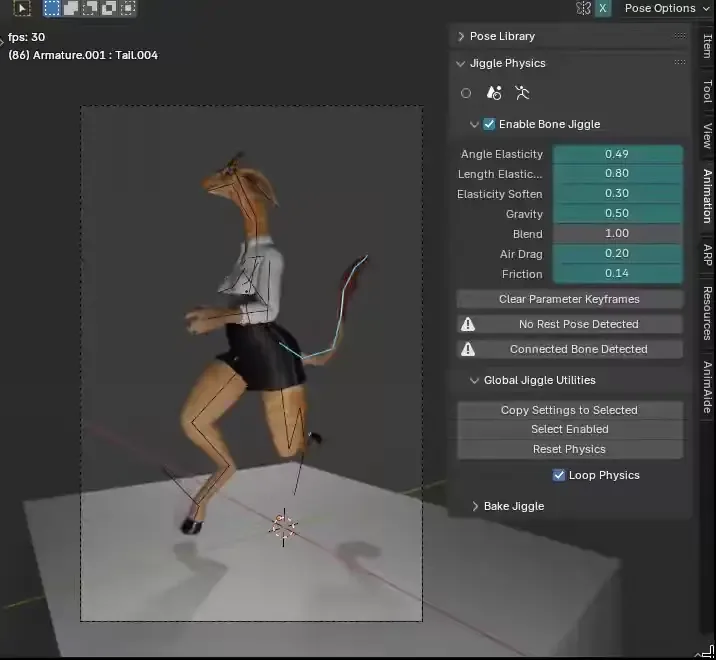
- 在动画标签下找到Jigle物理,按下3D视图端的N键。
查看官方原文摘要(English)
Jiggle Physics
Jiggle Physics is a fork of the Wiggle 2 addon, by shteeve3d, with a variety of improvements.
Features
Design at runtime
- Reasonably performant within the viewport, allowing you to tweak jiggles while your animation plays!
Robust verlet physics solve
- Simple 0-1 parameters. Jiggle anything from soupy ropes to immovable rods.
- Verlet integration makes the system incredibly resilient to "exploding".
- Supports bone squash and stretch.
- Relativistic, reacts appropriately to elevators and vehicles.
Uses the same solver as Unity Jiggle Physics!
Collision support
- Supports good collision with scaled empties, and limited support for mesh collision. Unfortunately doesn't support bouncing or friction.
Overlays
Easily accessible overlays allows you to see the system's detected rest pose (in green), and the simulation (in red).
You can use this to visualize collision radius of bones:
Usage
- Find Jiggle Physics under the Animation tab by pressing the N key in the 3D viewport.
安装方法
- 打开 Blender「编辑 → 偏好设置 → 获取扩展(Get Extensions)」,搜索 Jiggle Physics,可直接从官方库安装。
- 手动安装时,选择适合当前 Blender 版本与系统的 ZIP 包,在「获取扩展」右上角菜单选择「从磁盘安装(Install from Disk)」,选中 ZIP 文件,无需解压。
- 安装后,在偏好设置的「插件(Add-ons)」中确认已启用,并按作者说明使用。
下载安装包
请选择与你的 Blender 版本和操作系统相符的文件,下载由 Blender 官方扩展库提供。
正在加载安装包…
来源与许可
- 作者 / 维护者:naelstrof
- 许可:SPDX:GPL-3.0-or-later
- 来源:Blender 官方扩展库
© 版权声明
本站除原创作品外的资源均收集于网络,只做学习和交流使用,版权归原作者所有,请在下载后24小时之内自觉删除。若作商业用途,请购买正版。
THE END


暂无评论内容