


资源介绍
Export cameras, images and empties to Adobe After Effects
Compatibility: Blender 4.2.0+
官方介绍(中文整理)
向Adobe After Effect公司导出相机、图像和空域。
导出动画相机、灯光、图像、其他物体位置和跟踪标记,从Blender到Adobe After Affect。
使用方法
从金银导出
通过进入用户首选项的扩展部分激活扩展名,搜索“后”并单击结果左侧的复选框。
然后,导出商可以从文件菜单 (F4) 中获取,导出, Adobe After Affect (.jsx)。选择文件名称和选项,并按“Export to Adobe Fact After Effect” 按钮单击。
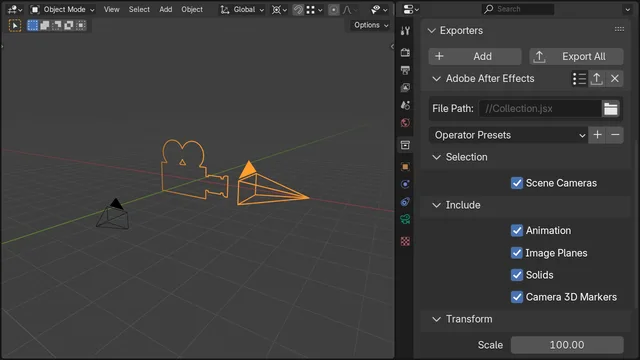
您也可以从收藏财产中建立导出商。
导入效果后
生成的文件是一个扩展Script 文件, 可以装入“ 效果后” 文件。 要导入此场景, 您可以打开“ 影响后” 菜单、 脚本、 运行脚本文件… 并选择 .jsx 文件。 这将提示您使用一个组成名称, 并设置相机和对象来创建它。
作者作者作者
该导出商最初是由Bartek Skorupa撰写的,由Thomas Volkmann、Atom、Adam Wasila、Paolo Ciccone、François Tarlier和Campbell Barton撰稿。
目前,它由西班牙妇女联合会负责维护。
查看官方原文摘要(English)
Export animated cameras, lights, images, other object locations and tracking markers from Blender to Adobe After Effects.
Usage
Exporting from Blender
Activate the extension by going to the Extensions section of the user preferences, search for “After” and click the check box to the left of the result.
The exporter is then available from the File Menu (F4), Export, Adobe After Effects (.jsx). Select the file name and options, and hit the “Export to Adobe After Effects” button.
You can also set up an exporter from the collection properties.
Importing into After Effects
The generated file is an ExtendScript file that can be loaded into After Effects. To import the scene, you can open After Effects and go to the File menu, Scripts, Run Script File… and select the .jsx file. This will prompt you for a composition name and create it, with the cameras and objects set up.
Authors
This exporter was originally written by Bartek Skorupa with contributions by Thomas Volkmann, Atom, Adam Wasila, Paolo Ciccone, François Tarlier, and Campbell Barton.
It is currently maintained by Les Fées Spéciales.
安装方法
- 打开 Blender「编辑 → 偏好设置 → 获取扩展(Get Extensions)」,搜索 Export: Adobe After Effects (.jsx),可直接从官方库安装。
- 手动安装时,选择适合当前 Blender 版本与系统的 ZIP 包,在「获取扩展」右上角菜单选择「从磁盘安装(Install from Disk)」,选中 ZIP 文件,无需解压。
- 安装后,在偏好设置的「插件(Add-ons)」中确认已启用,并按作者说明使用。
下载安装包
请选择与你的 Blender 版本和操作系统相符的文件,下载由 Blender 官方扩展库提供。
正在加载安装包…
来源与许可
- 作者 / 维护者:Les Fées Spéciales
- 许可:SPDX:GPL-2.0-or-later
- 来源:Blender 官方扩展库


暂无评论内容