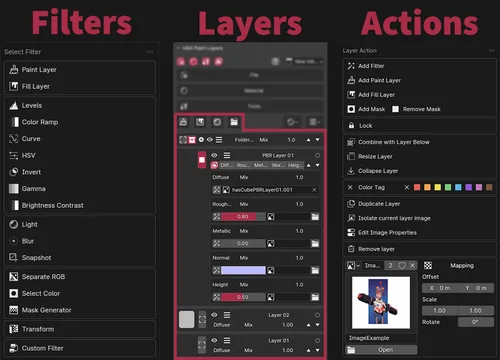


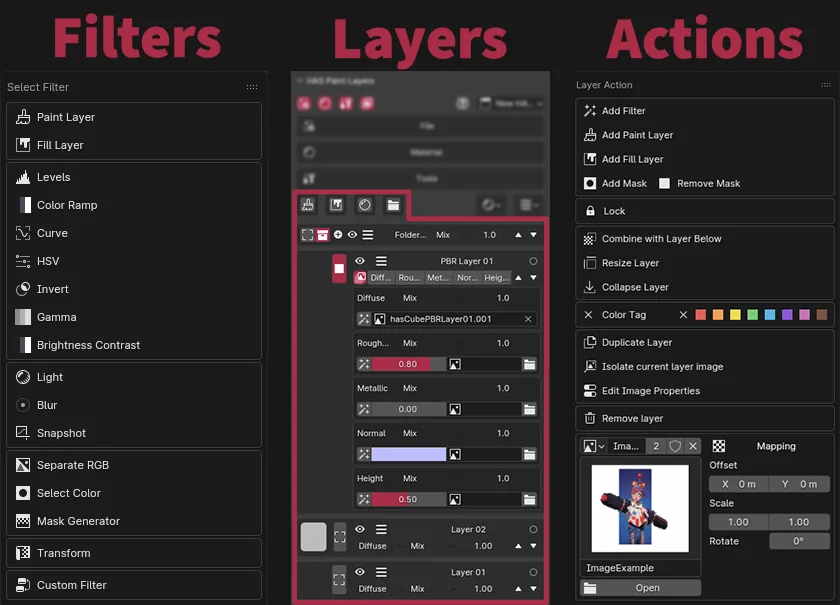
资源介绍
Layers for texture painting
Compatibility: Blender 4.2.0+
官方介绍(中文整理)
纹理绘画图层。
has pain Tilles is a blender add on 艺术家希望简化他们的纹理绘画过程, 此添加允许您创建和管理用于油漆纹理、 使用过滤器、 烘烤和其他工具的多层。
关键特性 :
- 图层管理: 创建、 组织和管理多层油漆。
- 过滤器:每一层可以有无限的过滤器和遮罩。
- 易烤烤
- 油漆工具
- PBR 纹理油漆: 纹理 PBR频道和简易设置
- 混合模式
- 预览图像和层的颜色
- 创建自定义节点组并将其用作过滤器
- 组合层、应用过滤器、调整大小
- 导出创建的纹理或作为 ORA
- 自动保存纹理
如何开始?
安装后, 您可以在 3d 视图 的侧面面板上找到 Hasas 油漆图层。 选择任何网格, 确定它是否被打开。 导航将打开面板, 并单击设置材料和设置场景。 然后添加油漆层( 左下角的Brush 图标) , 您可以开始绘制。 更多信息, 请使用 wiki – hirork. github.io/ HASPaintLayersWiki/
查看官方原文摘要(English)
HAS Paint Layers is a Blender add-on for artists looking to streamline their texture painting process. This add-on allows you to create and manage multiple layers for paint textures, use filters, baking and other tools.
Key Features:
- Layer Management: Create, organize, and manage multiple paint layers.
- Filters: Each layer can have unlimited amount of filters and masks.
- Easy Bake
- Paint tools
- PBR Texture Painting: Texturing PBR channels and easy setup
- Blending Modes
- Preview images and colors for layers
- Create custom node group and use it as filter
- Combine layers, Apply filters, Resize
- Export created textures or as ORA
- Autosave textures
How to start?
After installation, you can find HAS Paint Layers on the side panel in 3d View. Select any mesh, make sure it is unwrapped. Navigate to add-on panel, and click Setup Material and Setup Scene. Then add paint layer (Brush icon on bottom left corner) and you can start painting. For additional information, use wiki – hirourk.github.io/HASPaintLayersWiki/
安装方法
- 打开 Blender「编辑 → 偏好设置 → 获取扩展(Get Extensions)」,搜索 HAS Paint Layers,可直接从官方库安装。
- 手动安装时,选择适合当前 Blender 版本与系统的 ZIP 包,在「获取扩展」右上角菜单选择「从磁盘安装(Install from Disk)」,选中 ZIP 文件,无需解压。
- 安装后,在偏好设置的「插件(Add-ons)」中确认已启用,并按作者说明使用。
下载安装包
请选择与你的 Blender 版本和操作系统相符的文件,下载由 Blender 官方扩展库提供。
正在加载安装包…
来源与许可
- 作者 / 维护者:Hirourk
- 许可:SPDX:GPL-3.0-or-later
- 来源:Blender 官方扩展库


暂无评论内容